Native local AI inference,simple to install
Run LLMs, vision-language models, embeddings, and rerankers straight from Hugging Face SafeTensors checkpoints. Install from one archive or one Homebrew command and start serving.
- macOS · Apple Silicon
- Linux · NVIDIA CUDA
- Linux · AMD ROCm
- Windows · CUDA, ROCm
curl -fsSL https://mlxcel.ai/install.sh | sh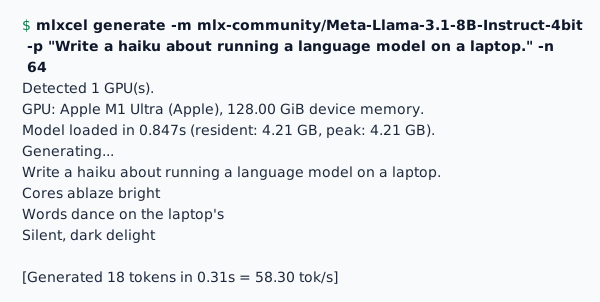
Text generation from the terminal. Run any supported model with a single command, with options for sampling, repetition penalties, and output format.
Run your first model
Install mlxcel, start a Qwen3-4B example, and send a request.
Install mlxcel
Run this in a terminal. Keep the exported PATH in that shell; use the download list for other builds and platforms.
All downloadscurl -fsSL https://mlxcel.ai/install.sh | sh \ && export PATH="$HOME/.local/bin:$PATH"Start the example model
Run in the same terminal. The first run downloads the Qwen3-4B checkpoint if it is not cached, so an internet connection and disk space are required. Keep the server running.
Choose another modelmlxcel serve -m mlx-community/Qwen3-4B-4bit --alias qwen3-4b \ --ctx-size 8192 --n-parallel 4Send your first request
Open a second terminal after the server is ready. The response contains generated text in choices[0].message.content.
Read the usage guidecurl http://127.0.0.1:8080/v1/chat/completions \ -H "Content-Type: application/json" \ -d '{"model":"qwen3-4b","messages":[{"role":"user","content":"Hello"}]}'
Features
- Architecture
- The model loader, scheduler, and inference loop run in one native Rust process, with no Python environment or container. Metal on Apple Silicon M1 through M5, CUDA on NVIDIA, and ROCm on AMD run the same MLX-based engine.
- Model coverage
- Dense transformers, MoE, SSM, and hybrid models such as Llama, Qwen, Gemma, DeepSeek, and Nemotron-H, plus vision-language, embedding, reranking, speech, and object-detection runtimes. 4-bit, 8-bit, 1-bit, MXFP4, MXFP8, and NVFP4 checkpoints load with no conversion step.
- Supported APIs
- mlxcel-server serves OpenAI chat, completions, and Responses, Anthropic Messages, audio, realtime voice, embeddings, rerank, and a built-in WebUI from one process, with SSE streaming and tool calling. It accepts supported llama-server flags and LLAMA_ARG_* environment variables.
- Memory and caching
- Paged KV caching manages request memory, and prompt-prefix caching reuses prior computation. INT8 and TurboQuant modes shrink the KV cache when memory is tight, and a memory estimate checks whether a model and context fit before it loads.
- Scheduling and decoding
- Continuous batching, speculative decoding with MTP, DFlash, and drafter-free prompt lookup, and block diffusion for supported models. Runtime model surgery and language-bias policies adjust behavior without retraining.
- Scaling out
- Tensor parallelism splits a model across GPUs; pipeline parallelism assigns layers to machines, with mDNS peer discovery and disaggregated prefill and decode. As the engine inside Backend.AI GO and Backend.AI clusters, the same models move to shared GPU infrastructure.
Performance
| Model | Class | Prefilltok/s | Decodetok/s |
|---|---|---|---|
| smollm-135m-4bitSmall dense | 53,385.5 | 475.0 | |
| qwen3-4b-4bitDense | 7,111.4 | 85.2 | |
| llama-3.1-8b-4bitDense | 4,207.6 | 49.8 | |
| gpt-oss-20b-mxfp4MoE | 736.2 | 89.4 | |
| mixtral-8x7b-4bitMoE | 352.3 | 28.3 | |
| qwen3.5-35b-a3b-4bitHybrid MoE | 464.0 | 73.1 | |
| nemotron-h-30b-4bitHybrid SSM/MoE | 206.9 | 93.9 |
Downloads
Latest release for macOS (Apple Silicon) and Linux (CUDA). v0.8.1
| File | Platform | Contents | Size | Format |
|---|---|---|---|---|
macOS · Apple Silicon · Metal · CLI and server · ZIP | 86.5 MB | ZIP | ||
Linux · x64 · CUDA 13 · CLI and server · ZIP | 171.4 MB | ZIP | ||
Linux · ARM64 · CUDA 13 · CLI and server · ZIP | 102.3 MB | ZIP |
Homebrew
Install the macOS release with Homebrew.
To move to a newer release later:
Requires Homebrew on Apple Silicon. The formula tracks each stable release.
Build from source
For CUDA or ROCm toolchains, custom features, and machines without a prebuilt archive.
$ git clone https://github.com/lablup/mlxcel.git$ && cd mlxcel$ && cargo build --release --features metal,accelerateNeeds the Metal Toolchain from Xcode.
Every build needs Rust 1.97, the version pinned in rust-toolchain.toml; rustup installs it on the first build. The manual lists the full prerequisites.